Drive time not included
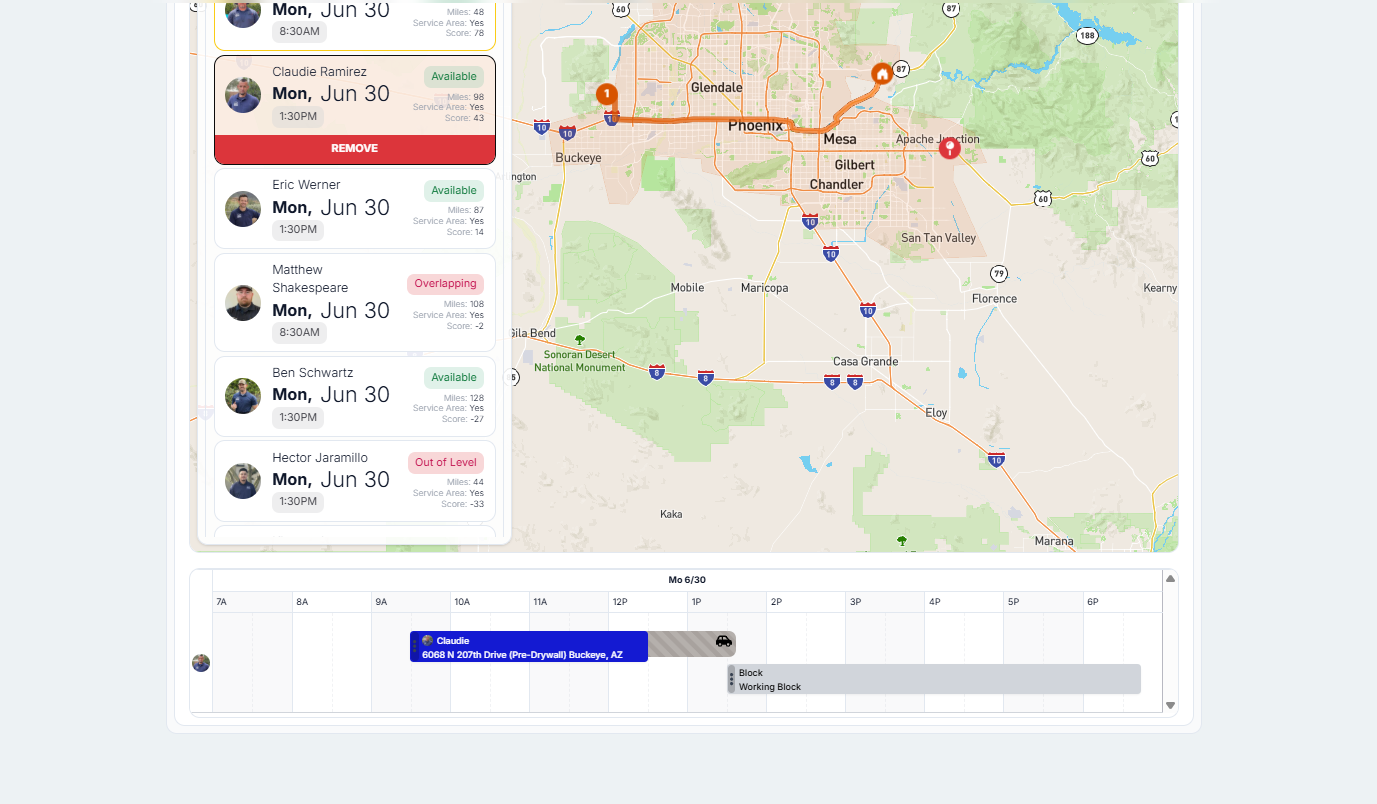
Hey Chris! I noticed when teaching how to schedule today that the scheduler will recommend an inspector even though with their drive time it would put that over the start time. So for this example it’s saying to book at 130pm even though the inspector can’t get there until 1:37pm based on the drive time
Log in to comment and vote
Comments3
Jul 8, 2025
PinnedDrive time will be taken into account right before the quote or job is created. The model will run an analysis, offer an option to skip, or adjust the time in 10 min increments.
You can also bypass this whole thing in settings:
RIGHT NOW THIS DEFAULTS TO OFF AND NEEDS TO BE TURNED ON IF DESIRED.
Christopher Scott
Jun 27, 2025
@Shayna Turilli @Josh Furman this is a good point. However if we didn’t recommend the slots at all, then it would make a lot not show up. What if we still recommended them but gave a warning to the scheduler that drive time could affect start time with the option to push things back by 15 min or an hour etc.
Shayna Turilli
Jun 30, 2025
I think that’s a great idea!